
How IT Admins Can Recover Mailbox Data From an Employee's OST File After Offboarding
When an employee leaves, the usual offboarding steps are to disable the account, remove the licence and delete the mailbox. The problem starts weeks later, when someone asks for an old email thread, and the only copy left is an OST file sitting on the former employee's laptop.
This guide covers what that file is, why Outlook can't open it anymore, and how to recover the data safely.
Why the OST file stops working after offboarding
An OST file is an offline cache of a mailbox. It's tied to the account and Outlook profile that created it, so once the Exchange or Microsoft 365 account is deleted, the connection is gone. The file still contains emails, attachments, contacts and calendar items, but Outlook has nothing to open it against. IT teams call this an orphaned OST file.
Step 1: Protect the original file first
Before you try anything, copy the OST file to a safe location. On most Windows machines it's in the user's AppData\Local\Microsoft\Outlook folder, though the exact path can vary by Outlook version. Work only on the copy so you can retry if the first attempt doesn't give the result you wanted.
Step 2: Check your retention and legal requirements
Mailbox data can contain personal and confidential information. Before you recover it, confirm that your retention policy or a legal hold allows access, and note who requested it and why.
Step 3: Understand why Outlook's export won't work
The File > Open & Export route in Outlook works only if the OST is still connected to a working profile. If the account is deleted or the profile is gone, that option isn't available, so you need a tool that can read the OST file directly.
Step 4: Use a dedicated OST recovery tool
A good tool should:
- Scan the OST file without needing the original Exchange server or Outlook profile
- Show a preview of folders, emails and attachments before conversion
- Let you select specific folders instead of exporting everything
- Split large PST output into smaller files
- Export to PST, or to formats like EML, HTML and MHT, or migrate straight into Microsoft 365 or Exchange Server
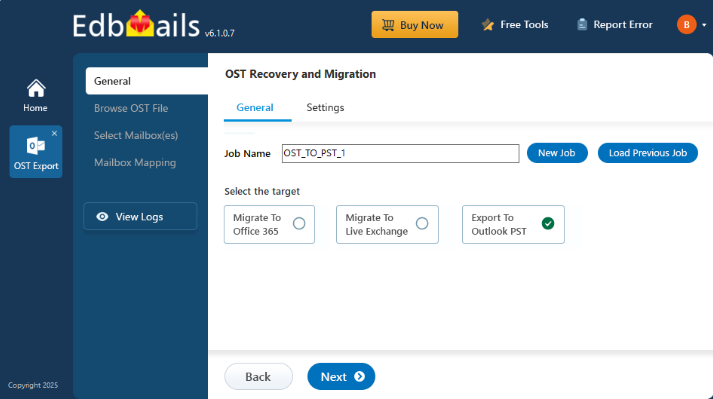
One example is the OST to PST Converter from EdbMails, which offers these options. Whichever tool you choose, try the free version or a trial first to check the recovery results in the preview.
Step 5: Verify and hand over
Open the resulting PST file in a working Outlook profile and spot-check a few folders, such as Inbox, Sent Items and Calendar. Then store the PST in a secure location with restricted access, and record where it is.
Common mistakes to avoid
- Deleting the laptop or wiping the disk before checking for OST files
- Working on the original OST file instead of a copy
- Skipping the preview and finding missing folders after the export
- Leaving recovered PST files on shared drives without access controls
A simple prevention tip
Add a mailbox export or archive step to your offboarding checklist, so important mail is saved as a PST before the account is removed. It takes a few minutes and saves a lot of effort later.

 English
 Arabic
 French
 Spanish
 Portuguese
 Deutsch
 Turkish
 Dutch
Dutch
 Italiano
 Russian
 Portuguese (Brazil)
 Greek
Greek